Switch from QuickBooks without starting over
Run DynaTax AI next to QuickBooks for 14 days. Bring your history over by file, check the numbers, then decide. Once you switch, the books take less of your week, and the rest of it is yours.
14-day free trial · No credit card required
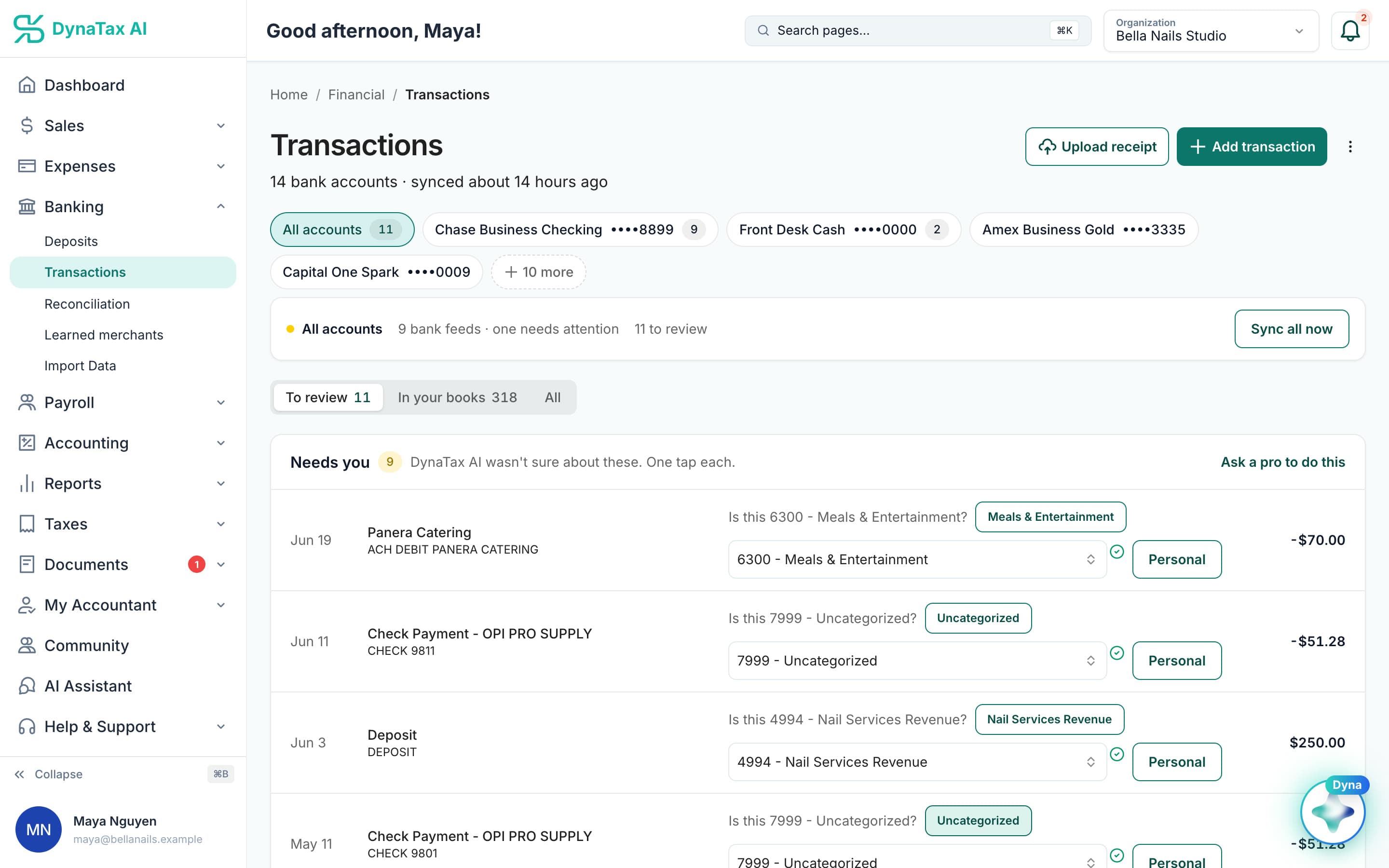
Product screen with sample data
Your week, before and after
Less time in accounting software. More time for everything else.
What changes for a QuickBooks user once the books live in DynaTax AI.
Before: Building bank rules so the feed sorts itself.
No rules to build
Dyna suggests an account for each transaction with a confidence score, and you approve it. Merchants you've already confirmed fill in next time.
Before: Paying more every time someone joins the books.
Room for a small team
Growth is $49 a month for 3 users. An accountant you invite doesn't use one of your seats.
Before: Digging through menus for the report you need.
Reports in plain view
P&L, Balance Sheet, Cash Flow, General Ledger and Trial Balance come with every paid plan. Or ask Dyna a bookkeeping question; it lists its sources.
What it costs
Pay less for the same size team.
Monthly list prices, billed monthly. Pay yearly for DynaTax AI and get two months free.
| Team size | DynaTax AI | QuickBooks Online* |
|---|---|---|
| Just you | Starter $291 user | Simple Start $381 user |
| Small team | Growth $493 users | Essentials $853 users |
| Growing team | Pro $9910 users | Plus $1405 users |
- $108 / yrless on the entry planStarter $29 vs Simple Start $38
- $432 / yrless for a 3-user teamGrowth $49 vs Essentials $85
- 2× the usersfor $99 a monthPro: 10 users for $99 · Plus: 5 users for $140
* QuickBooks Online list prices from quickbooks.intuit.com/pricing, checked Oct 18, 2026, before introductory offers. QuickBooks is a trademark of Intuit Inc.
After the switch
Check the numbers against QuickBooks, side by side.
During your trial, run the same reports in both and compare. These are real DynaTax AI screens with a sample business.
Your bank feed, sorted for review: Dyna asks only about the ones it isn't sure of · sample data
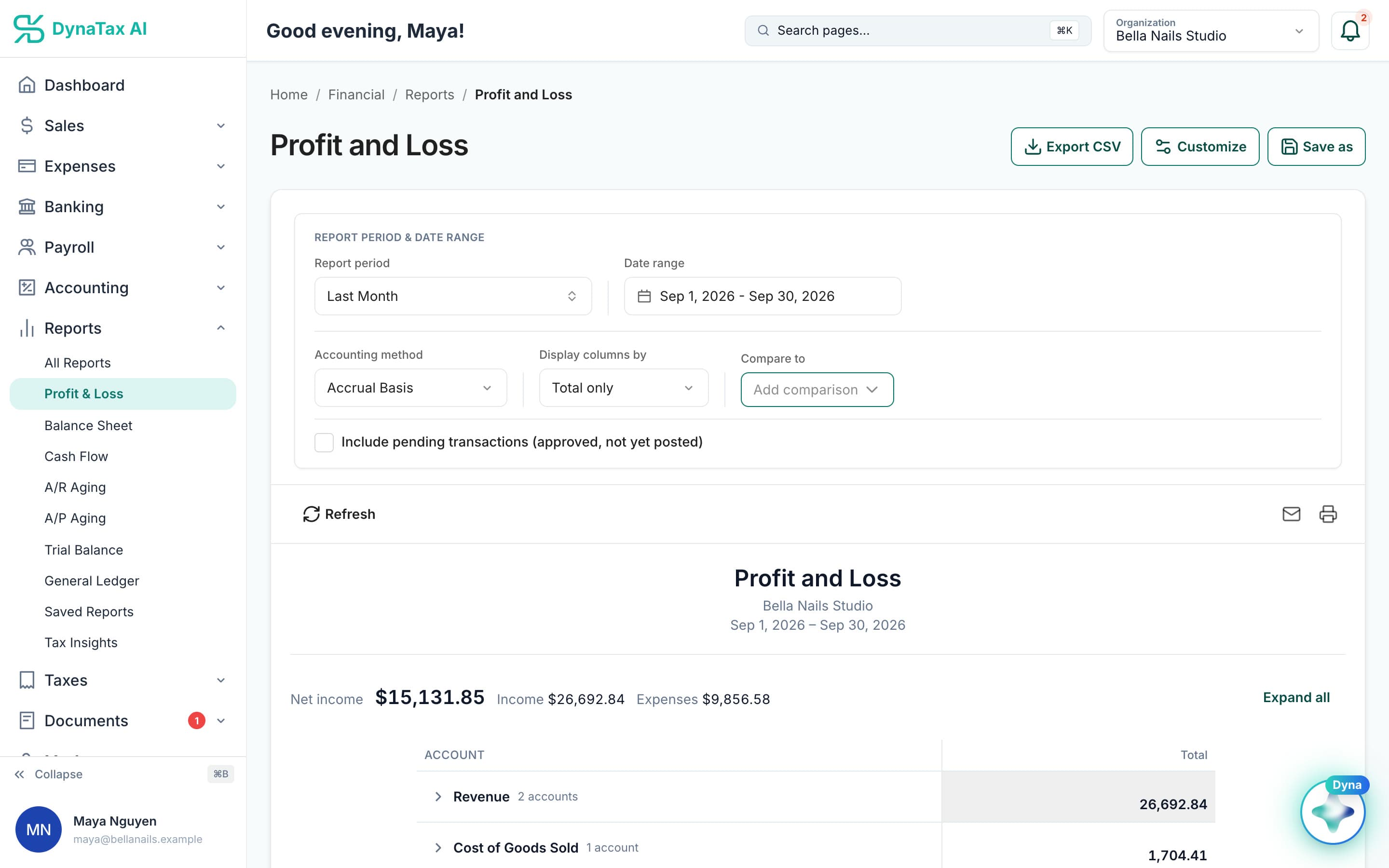
Profit and Loss for last month, accrual basis · sample data
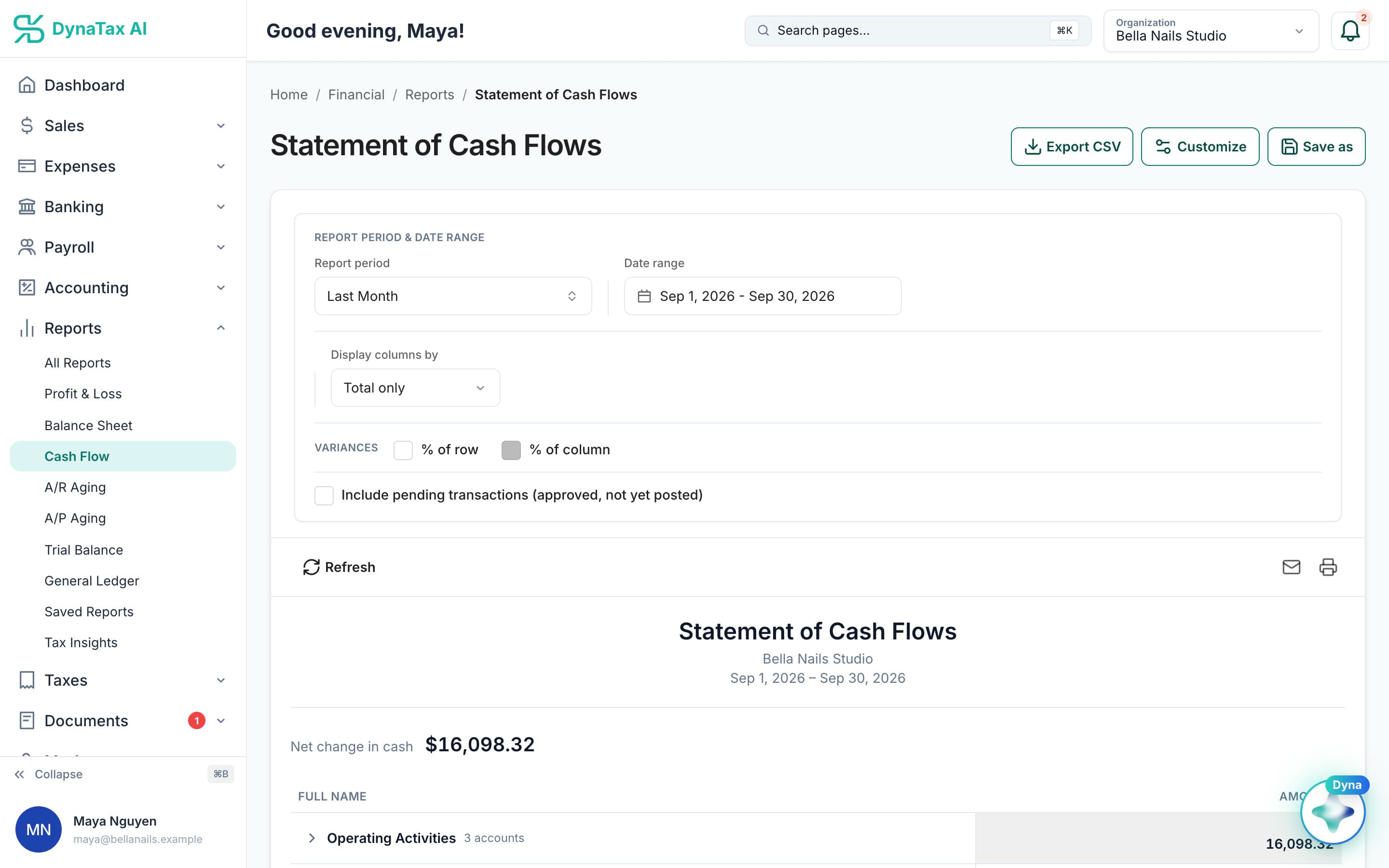
Statement of Cash Flows for the same month · sample data
Switch at your own pace
Still on QuickBooks? You don't have to decide today.
Keep QuickBooks running while you try DynaTax AI. Bring your history over by file, check the numbers, then decide.
- QuickBooks exportCSV · Excel · QBO/OFX
- Import DataFrom another app
- Review & reconcileEvery row, before it posts
- Step 1
Start your trial
14 days free, no credit card required. Keep QuickBooks running while you try it.
No credit card
- Step 2
Connect your bank
A secure, read-only connection to your US bank. It can see balances and transactions; it can't move money. New transactions sync daily.
Read-only · syncs daily
- Step 3
Bring your QuickBooks history
Export your lists and transactions from QuickBooks as CSV or Excel, then go to Import Data → From another app. You review every row before it posts.
CSV · Excel · QBO/OFX
- Step 4
Review and reconcile
Compare the reports with QuickBooks and reconcile against your bank statement. Then decide.
With you or your CPA
No surprises
What DynaTax AI supports, and what it doesn't yet.
Supported today
- CSV and Excel files
- QBO / OFX bank downloads
- Transactions
- Chart of accounts
- Opening balances
- Journal entries
- Customers and vendors
- Invoices and bills
Not yet
- QuickBooks company files (.QBW / .QBM)
- A direct QuickBooks Online connection
- Tax filing and e-file — coming soon
- Payroll and online invoice payments are rolling out — availability depends on your account
FAQ
Switching questions
Run your business. Live your life.


Try it next to QuickBooks for 14 days, no credit card required. Bring your history over, check the numbers, then decide.
No credit card required